How to Advertise on Facebook?
21:08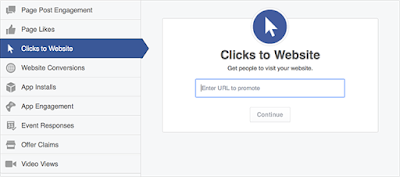
Making advertisements on social media
networks build more traffic and leads to you because social media is an electronic word of mouth. Especially
making advertisements in Facebook makes us to reach your business goals.
More than 1.3 billion
people use Facebook to connect with what matters to them, and 64% visit every
day. Facebook Adverts are shown to people based on their location, age,
interests and more. Most online advertising relies on "cookies" to
decide which adverts to show on different sites. On Facebook, your adverts are
delivered more accurately to the audiences you choose.
Facebook marketing helps your business build lasting relationships with people and
find new customers. You can create targeted adverts for different audiences,
set your budget and measure the results across devices.
Advertising on Facebook helps you to reach your business goals as
- To drive online sales
- Increase local sales
- Promote your business
- Raise your brand awareness
In order
to meet the people who will love your business, you need to follow 4 steps:
- Use free Facebook page to get started
- We will decide what we want to promote
- We need to choose the audiences for your Facebook advertising
- Finally set our budget and then track your results
First
you need to register as a user in Facebook and then login to Facebook. To create an ad campaign, you
need to go www.facebook.com/ads/create . Ad creation takes you through
the process of:
- Choosing your objective: You need to choose your advertising objective as what people want to do when they see your ads. The advertising objectives you can choose from are:

For website conversions
option you will need a conversion
pixel for your website before you
can create this ad. For this you need to follow the steps:
Go to Power editor->
Mange ads and then select conversion tracking->click create pixel then code
will appear->Need to copy the code and then upload that in your webpage.
- Naming your campaign: Create a name for your campaign or use the default name that appears. For example if you select clicks to campaign then your campaign name as:

- Choosing your audience: If you know the specific people you want to reach, then use demographic options (ex: location, age, school), interests and behaviors to create your audience. The snapshot is as shown:

The
main advantage is that at right side of the page it displays the estimated
potential reach based on filled fields.
- Setting your budget, bid and ad schedule: In this you need to fill the corresponding fields:

- Naming your ad set: you need to create a name for your ad set or use the default name that appears. For example:

- Choosing your images: You will upload your images in the Choose different images to create multiple ads section.

The supported image formats are
png (recommended), jpg, gif, ico, bmp. The image
text should not exceed 20%. Our image will be scaled to fit
within a maximum width of 100 pixels and maximum height of 72 pixels.
- Adding texts/links and choosing your ad placements: After choosing your images, you need to fill add text and or links to your ad. A character limit will appear when you edit our text to ensure that your audience will be able to see your entire message.
Headline – 25 characters
Text – 90 characters
Link description – 200 characters

- Placing your order and choosing how you want to pay for your ads:
Bing Ads Creation and Strategy in Comparison with Google AdWords
03:04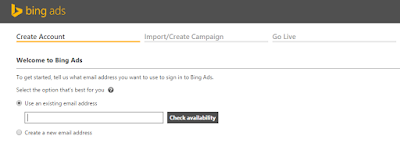
Bing ads are formerly known as
Microsoft ad center and MSN ad center. A Bing ad is a service that provides pay
per click advertising on both the Bing and yahoo search engines. The Yahoo Bing
network is the combined advertising marketplace consisting of Yahoo, Bing and
related partner sited. They all work together to bring us a distinct, valuable
audience. Millions of searches using this network.
Bing Ads is the online advertising
platform that allows us to reach potential customers across the Yahoo! Bing
network and bring them to our website. Bing Ads we to create ads for our
business that can display whenever a person conducts a relevant search on
Yahoo! or Bing, or visits our site in their network.
Similar to Google AdWords,
Bing Ads uses both the maximum amount an advertiser is willing to pay per click (PPC) on our ad and the
advertisement's click-through
rate (CTR) to determine how
frequently an advertisement is shown. Bing Ads also provide a desktop tool to
manage campaigns offline, called as Bing
Ads Editor as like Google AdWords. Using this editor we can make offline
changes to our campaigns and later sync it online.
How Bing ads and yahoo works for us?
Search engine marketing (SEM) and pay-per-click advertising
(PPC) can be summed up in three simple steps:
- People search online for a product or service: They enter search terms (called keywords) into search engines like Bing or Yahoo.
- They find our ad: If the keywords in our ad match a search, our ad appears next to or above search results on Bing and Yahoo.
- Customers reach out to us: We can configure our ad so people can call us, visit our website, or go right to our door.
Creation of Bing Ads
Account Creation: You
need to follow the below steps to create an account on Bing.
Create a Microsoft account:
In order to create an ad in Bing, first you need to create a
Microsoft account that account is your sign in for all Microsoft products.
· Sign up for Bing Ads:
Once you have created your Microsoft account,
we click the link as:
Now you can sign up for Bing Ads by
just clicking the sign up button. Then click sign in with an existing Microsoft
account.

Enter your
account information:
You need
to fill your basic information about your company, business phone number,
currency; time zone and then click create account. Once you create an account
you cannot change the currency. The time
zone for our campaigns is default time zone or set a time zone specific for the
campaign. Time zone does not affect billing and all bills are based on Pacific
Time. Its screenshot is as shown:

Campaign
Creation on Bing:
Once you complete that account
creation then you are ready to begin creating new campaigns. Its screenshot is
as shown:

In order to
create an account on Bing you need to follow the below steps:
- Click campaigns > click create campaign

- Enter a Campaign name,
select a Time
zone, and then enter a Campaign budget.


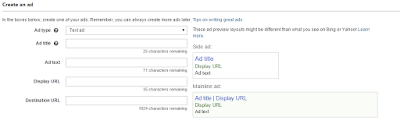
- Enter your Ad title,
the Ad text,
a Display
URL, and the Destination URL.
- Click Research >
Select Keyword >
Click Add >
Click Save.


Your customers see your ads on the Yahoo Bing Network when your
keywords match the customer's search query or other input. You can also type your
own keywords in the box.
- Enter a Search network bid and a Content network bid and then click Save.

The bids you enter in this last step are default bids that
will be used if you do not enter specific bids for your keywords.
Finally you will enter the payment details and add some
balance in your account then only your ads goes live and visible to the
customers.
* Important Notes:
- As like in AdWords, Bing also have Ad extensions those are:
a. Location Extensions
b. Call Extensions
c. Sitelink Extensions
d. App Extension
- In Tools tab you have different tools as

As like in Google AdWords, Bing also
has Research keywords tool rather than keyword
planner.
- All tabs are same as like in AdWords but we have an extra Reports and Import campaign tabs on Bing

In Reports tab you can run or
download your campaign performance result.
In import campaign tab you can import
the campaigns from file or from Google AdWords
Why did your AdWords Ad disapproved by Google?
01:33
This article will discuss about
how your pay per click search network only campaign ad is disapproved and how
to fix a disapproved ad and get approval by Google with little efforts.
Everyone know that in pay per
click advertising we have a structure as campaign > ad group > keywords >
Ads. In Google AdWords every ad copy we
mentioned should be verified and approved by the Google then only your ads gets
visible to the users otherwise it won’t shows to your potential customers.
Why your Google AdWords PPC ad
gets disapproved?
In order to approve your ad copy
first Google will check your ad based on following aspect:
- Display URL must be your valid business domain URL but not keyword based URL.
- They will check your given landing page URL is valid or not. Before conforming makes sure you spelled correctly your landing page URL or not.
- Every word in all fields (headline, description line 1 & 2, display URL and destination URL) of your ad copy should not be all capitals and no inter capitals between words. Make sure all your words are lower case or first letter capital in every word.
- No usage of punctuations, special symbols, no exclamatory symbol in headline and no more exclamations in your ad
- No HTTP error and you will make sure that your landing page doesn’t have invalid HTTP respond code.
- No insertion of phone numbers in your ad text and Sitelink ad extension
- No landing page loading error and make sure that your landing page should load perfectly without any internal server error.
- No spelling and grammatical mistakes in your text ad
- Make sure that your final URL domain should equal to your landing page URL domain.
How to fix and resubmit a disapproved ad?
For that you need to click
campaigns tab > ads tab > click on pencil icon at right side of your ad.
Then edit and resubmit your ad.
In our account at right side you
have notifications in bell symbol, click on that and click fix it
then it shows reason why your ad gets disapproved and then edits your ad copy
and again resubmits
click on that and click fix it
then it shows reason why your ad gets disapproved and then edits your ad copy
and again resubmits
click on that and click fix it
then it shows reason why your ad gets disapproved and then edits your ad copy
and again resubmits
(OR) Adwords e-mail you regarding
your disapproved ad and its reason, know that and fix it by editing your ad
copy.
If you even not understand what
may be the exact reason why your ad get disapproved then you need to concern
and take help from Google AdWords support https://support.google.com/adwords/ and you may post your questions in AdWords
community then some Google AdWords experts will clarify all your questions.
Hope all above mentioned
information will helpful to you how to fix your AdWords ad and gets approval by
Google AdWords.
Case Study to Advertise Online Education
01:17
Planning to promote online education business website with
an online advertising, best option is Pay Per Click (PPC) campaign in Google
AdWords advertising.
Before planning
to consult the search engine marketing company, to advertise an online
education business website, it is better to know the following things to begin
with PPC campaign search engine marketing:
- Need to know the goal of an AdWords campaign.
- Need to know who are the target customers to sell your products are?
- And which language they speak?.
- Need to decide how much amount you want to spend to reach targeted customers i.e. AdWords campaign budget.
Here is how i moved into the PPC advertising campaign
with Google AdWords search engine marketing system.
I prepared a list of questions to ask myself before
starting a Google Pay Per Click (PPC) AdWords Campaign setup and i categorized
all questions into 3 categories. Namely 1) Campaign Creation 2) Campaign Setup
3) Campaign Management.
Questionnaire for
Google Adwords campaign
Campaign Creation:
- What are the goals of this PPC campaign?
- What is the budget of the campaign?
- What is the estimated daily budget?
- Where and how to do competing customer analysis?
- What is the expected ROI of the campaign?
- What is the time frame for this campaign?
Campaign
Setup:
7. What kind of account details to start a
campaign?
8. Who is my Primary Target Audience?
9. What is my Desired or Target Cost per
Conversion (TCPC)?
Campaign Management:
10. What type of bid management system need to
enable for keyword buys?
11. What is my current keyword ranking status in Google
search engine?
12. How many keyword groups need to manage the
campaign?
13. Which network is suitable option for my ppc campaign?
14. Is there any Specific Offers i’d like to
Promote?
15. Is new landing page creation and keyword
optimization needed?
Setting up
AdWords Campaign:
In
Pay Per Click (PPC) search engine advertising program, I want to create a
campaign in AdWords and initially run my PPC ads in 30 days. My predefined business
goals to start this Google Pay Per Click campaign for my online education
website are:
- My product/service that I can provide to my online training course and certification.
- The main goal of my AdWords campaign creation is to receive a good number of online conversions by filling and submitting the lead form ending with a thank you page.
- My targeted customers are from the UK country and they can speak English language.
- The monthly budget that I can spend to reach UK customers is 100$.
I created a Google account in AdWords and set as US
time zone and US currency ($). Before starting a PPC (Pay Per Click) campaign
firstly, i researched about keywords which are relevant to my training course
and finally selected 30 keywords.
I started a search
network only campaign with one Ad group. In this ad group I added 30
keywords and placed 3 ad copies. Entered billing information and set the
payment type as automatic. Finally,
my ads are in live now. I started the AdWords campaign on 27th
January 2015 and still running now. I am not yet consulted for any best PPC
management agency or Search engine marketing company or any PPC consulting
services for advertising or marketing my online education business website.
AdWords
Campaign Management:
On my first day of PPC campaign creation i received
only a single number of impressions so then i started doing PPC campaign
optimization. The following are the changes i have done in AdWords PPC
management:
- Initially, all my keywords are in exact match and later i changed match types from exact to phrase and also changed the keywords bids to get high rankings.
- I included 3 ad copies out of 3 one ad is performing well and having more impressions. Other 2 ad copies are replaced with some new ad copies and also changed display URL’S of all 3 ad copies.
- After these 2 optimizations I received enough impressions and 3 to 4 clicks but no conversions, then i did AdWords landing page optimization. In order to get leads i optimized my AdWords landing page by changing the image banner, header tag and lead form text. Then finally i got 2 conversions on that day.
- At weekends all my AdWords performance is decreases and i received a very less number of impressions, no clicks and no conversions.
The changes i have made in my Next weeks are:
- I again researched about some new keywords which are relevant to my business course and added those keywords in the ad group and also paused some keywords which are not performing well. Then i received enough impressions and 3-4 clicks daily.
- Did AdWords landing page optimization- i added some new content and made some changes to my AdWords landing page.
- Wrote catchy new ad copy descriptions and modified the 2nd ad copy description which is not performing well. After these ad description optimization also i didn’t receive any clicks and conversions.
- Optimized the whole campaign by changing bids of keywords and all. Finally, i changed my bid strategy to automatic and got maximum clicks within my daily budget limit. Even though i dint get any conversions and my budget was reached the maximum limit.
- Again, i have been following manual bidding, then now i am getting some clicks and optimized my AdWords landing page with seo optimization techniques to get conversions.
*Now my Ads are running successfully with
satisfied ROI
Lessons I
learned in AdWords PPC (Pay Per Click) management services:
- I learned a lot of things while running this Google PPC campaign till now those are:
- I utilized all the best AdWords tools those helped me and AdWords advices then gave me good suggestions like how to improve my quality score and bid management of keyword.
- I learned how importance of my AdWords landing page to get more leads and online conversions.
- Learned how to target the UK customers and how to think in terms of user’s perspective and also how to manage AdWords management fees.
- How important Ad rank is and how much impact this Ad rank to get clicks and improve PPC ROI.
- Learned How to take the Google AdWords Customer help center and recommendations from Ad Word PPC expert community.
What is Call-only Ads in Google Ad Words?
03:25
As you know every time Google will
introduces new Ad Words updates in Google Ad Words in order to improve your Ad Words campaign performance. Google Ad Words introduces a call-only campaign for the businesses who want only phone calls.
What is Call-only Campaign?
Call-only campaign is only for the advertisers
whose conversion goal is to increase phone calls for your business. This
campaign mainly focuses on to get as many phone calls from the people who click
on your ad. Currently this type of
campaign is available in search network
only campaigns and can use CPC bidding. You need to pay for each click it
means have to pay for each phone call and its pay per click costs is very
expensive. These types of ads can only
appear on devices which people can make phone calls and are only to improve
more business phone calls. For this you need to create a separate campaign with
ad groups, ads and keywords. When a person clicks on your ad it doesn’t go into
your PPC landing page and these ads just generates calls for us. You need to provide a reference URL to
Google which contains your phone number.
How to create a call-only campaign?
You need to create a separate
call-only campaign as like normal PPC campaign. The following are the steps how
to create a call-only campaign:
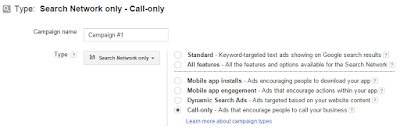
- Create a campaign in campaigns tab
- Select the network type as search
network only and then select call only option at right
- Fill the remaining information like your targeted location, language, budget, bidding strategy.
- Then save your details and continue
- Create an ad group with relevant name
- Create an ad, its fields are as shown


Verification URL is your business website URL that contains your phone number and this URL should contain the same brand as you mentioned in your ad display URL.
7. Add your targeted keywords and then save the ad group
After filling this information your ad will looks in mobile device as shown:
7. Add your targeted keywords and then save the ad group
After filling this information your ad will looks in mobile device as shown:

Limit for call-only ads are
character limit for
call-only ads
|
||
Fields
|
Char limit for most
languages
|
Char limit for
double width languages
|
Business Name
|
25
|
12
|
Phone number
|
none
|
none
|
Description Line 1
|
35
|
17
|
Description Line 2
|
35
|
17
|
Display URL
|
35
|
17
|
Rules to create call-only ad:
The rules for creation of text ad are
also applicable to these call-only ads but you need to concern only with adding
phone numbers. The numbers which you don’t include are as follows:
- You don’t use fax numbers, premium numbers (people may pay additional charge to make a call), vanity numbers (which includes some letters in between numbers).
- The given number must be in active and accurate. And also the given number must be a local number for your targeted country.
Advantages:
- This call-only campaign is useful for the business that has their conversion goal as phone calls. By using this feature you will get more enough phone calls to your business.
- Adding phone numbers to your ads are very easy to people to connect with you and enquire about your business and get Ad Words traffic for your business.
- You can also count these phone calls as conversions to your business
- You can also share these phone numbers to either your ads in ad groups and also to your whole campaign.
- You can kept any number to show only when you take any phone calls from people
Disadvantages:
- You have to pay for each phone call but Ad Words advertising cost will be very expensive.
- If user is not intended to call you but they click on your ad it means unintended phone call then your money was wasted for that click.
- Your device targeting is very important. It is not advantageous for all mobile devices and it is only for the devices which people can makes call for you.


